0%

Angular学习-5-路由2

路由守卫

意义

大部分系统中都存在权限问题,比如基本的权限如使用系统的人大致可以可以分为游客,用户,管理员。更加复杂的权限如用户也存在等级,不同等级的用户有不同的功能,而且管理员也存在等级,不同等级的管理员所管理的业务也有区别。

Angular 项目的权限问题可以使用 路由守卫 解决,即通过 路由守卫 判断系统的使用者是否有权限进入某一个路由。

基本示例

1,在 cmd 环境下,使用命令 ng new high-route --routing 新建一个 high-route 项目。

2,cd high-route 进入 high-route 目录下,使用命令 ng g c homeng g c loginng g m console --routingng g c console/index 新建 home 组件, login 组件,console 模块,console 模块下 index 组件。

3,修改部分项目代码如下所示。
app-routing.module.ts

1
2
3
4
5
6
7
8
....//代码块
const routes: Routes = [
{path:'',redirectTo:'home',pathMatch:'full'},
{path:'home',component:HomeComponent},
{path:'login',component: LoginComponent},
{path:'console',loadChildren:'./console/console.module#ConsoleModule'}
];
....//代码块

app.component.html

1
2
3
4
5
6
7
<!-- 代码块 -->
<ul class="nav navbar-nav">
<li routerLinkActive="active"><a routerLink='/home'>Home</a></li>
<li routerLinkActive="active"><a [routerLink]="['/console']">console</a></li>
</ul>
<!-- 代码块 -->
<div class="container"><router-outlet></router-outlet></div>

console-routing.module.ts

1
2
3
4
5
....//代码块
const routes: Routes = [
{path:'',component:IndexComponent}
];
....//代码块

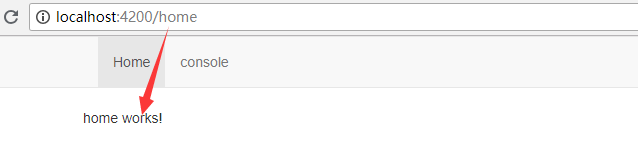
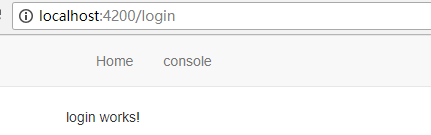
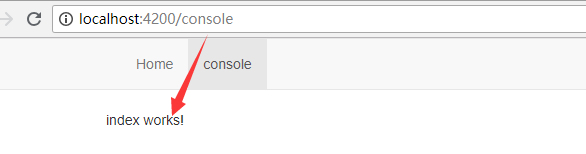
4,效果图如下所示。
home 路由

login 路由

console 路由

5,假如在实际项目中,console 模块为控制台台模块,系统的使用者是游客时无法进入 console 模块,只有游客注册登录后才能进入 console 模块。当系统使用者点击页面导航栏中 console 链接 时,系统需要判断当前系统的使用者是否有权限进入 console 模块,若有权限则进入,没权限进入 login 路由,这是路由守卫需要做的事情。使用 ng g s route-guard 创建守卫服务。修改 route-guard.service.ts 代码如下所示

route-guard.service.ts

1
2
3
4
5
6
7
8
9
10
11
12
13
import {Injectable} from '@angular/core';
import {CanActivate} from '@angular/router';

@Injectable({providedIn: 'root'})

export class RouteGuardService implements CanActivate {

constructor() { }

canActivate():boolean{
return false;//不可进入 若为return true 可以进入
}
}

这是最基本的路由守卫,当 canActive() 中返回 false 时,不可进入当前路由,返回 true 时可进入当前路由。

6,在 app-routing.modult.ts 根路由配置信息文件中使用路由守卫,代码如下所示。

app-routing.module.ts

1
2
3
4
5
6
7
8
9
10
11
12
13
....//代码块
import { RouteGuardService } from './route-guard.service';

const routes: Routes = [
{path:'',redirectTo:'home',pathMatch:'full'},
{path:'home',component:HomeComponent},
{path:'login',component:LoginComponent},
{path:'console',
loadChildren:'./console/console.module#ConsoleModule',
canActivate:[RouteGuardService] //使用路由守卫的地方
}
];
....//代码块

home 路由下,点击导航中的 console 链接,当路由守卫返回 true 时,页面进入 console 路由;当路由守卫返回 false 时,页面停留在 home 路由下,不能进入 console 路由页面。

7,上面的路由守卫只是最基本的路由守卫。在实际的项目中,路由守卫不可能这么的简单,在实际的项目中,关于路由守卫是有一定的逻辑的。修改路由守卫代码如下所示。
route-guard.service.ts

1
2
3
4
5
6
7
8
9
10
11
12
13
14
15
16
17
18
19
20
21
22
23
24
25
26
27
28
29
30
31
32
33
34
35
36
37
import { Injectable } from '@angular/core';
import { Router, CanActivate } from '@angular/router';
import { ActivatedRouteSnapshot } from '@angular/router';

@Injectable({providedIn: 'root'})

export class RouteGuardService implements CanActivate {

constructor(private router:Router) { }

canActivate(route: ActivatedRouteSnapshot):boolean{
// 当前路由名称
var nowPath = route.routeConfig.path;
// needGuardRoutes: 设置需要路由守卫的路由集合
const needGuardRoutes = ['console'];

var isLogin=true;//是否有权限
if (needGuardRoutes.indexOf(nowPath) >= 0) {
if (!isLogin) {
this.router.navigate(['login']);// 没有权限,跳转到login路由获取权限
return false;
}else{
return true;// 有权限,跳转到当前路由
}
}

if (nowPath === 'login') {// 当前路由是login时
if (!isLogin) {
return true; // 没有权限,跳转到当前login路由获取权限
}else{
this.router.navigate(['home']);// 已登录,跳转到home
return false;
}
}
return true;
}
}

运行本地项目,当 isLogintrue 时(有权限),在 home 路由下点击导航栏的 console 链接时,进入 console 路由。

isLoginfalse 时(没有权限),在 home 路由下点击导航栏的 console 链接时,进入 login 路由。

在实际的项目中,isLogin 不可能像现在这样直接写 truefalse 来代表是否有权限,应该通过其它的办法来判断是否有权限(不同的系统有不同的判断方法)。

路由传参

使用命令 ng g m product --routingng g c product/listng g c product/detail 创建 product 模块,list 组件,detail 组件。修改已有代码如下所示。

app.component.html

1
2
3
4
5
6
....//代码块
<li routerLinkActive="active"><a [routerLink]="['/console']">console</a></li>
<!-- 导航栏新增product链接 -->
<li routerLinkActive="active"><a [routerLink]="['/product']">product</a></li>
</ul>
....//代码块

app-routing.module.ts

1
2
3
4
5
6
7
8
....//代码块
{
path:'console',
loadChildren:'./console/console.module#ConsoleModule',
canActivate:[RouteGuardService]
}, //新增product路由
{path:'product',loadChildren:'./product/product.module#ProductModule'}
....//代码块

product-routing.module.ts

1
2
3
4
5
6
....//代码块
import { ListComponent } from './list/list.component';
import { DetailComponent } from './detail/detail.component';

const routes: Routes = [{path:'',component:ListComponent}];
....//代码块

参数是 Url 路径一部分

1,所传的参数是 Url 路径的一部分

修改代码如下所示。
product-routing.module.ts

1
2
3
4
....//代码块
{path:'',component:ListComponent},
{path:':productId',component:DetailComponent}
....//代码块

product/list/list.component.ts

1
2
3
4
5
6
7
8
9
10
11
import {Router } from '@angular/router';
....//代码块
constructor(private router:Router) { }

ngOnInit() {}

goToDetail(){
// this.router.navigate(['/product/3']);
// this.router.navigate(['/product',3]);
this.router.navigateByUrl('/product/3');
}

product/list/list.component.html

1
2
3
4
5
6
7
8
<!--代码块-->
<ul class="list-group">
<!-- <a routerLink="/product/1">第一个产品</a> -->
<li class="list-group-item"><a [routerLink]="['/product/1']">第一个产品</a></li>
<li class="list-group-item"><a [routerLink]="['/product',2]">第二个产品</a></li>
</ul>
<button class="btn btn-sm btn-default" (click)="goToDetail()">第三个产品</button>
<!--代码块-->

product/detail/detail.component.ts

1
2
3
4
5
6
7
8
9
10
11
12
13
14
15
16
17
18
19
20
21
22
23
import { ActivatedRoute } from '@angular/router';
....//代码块
export class DetailComponent implements OnInit {

productId:any;

constructor(private routerInfo:ActivatedRoute) { }

ngOnInit() {
// this.productId=this.routerInfo.snapshot.params["productId"];

// this.productId=this.routerInfo.snapshot.paramMap.get("productId");

// this.routerInfo.params.subscribe(data=>{
// this.productId=data['productId'];
// });

this.routerInfo.paramMap.subscribe(data=>{
this.productId=data.get('productId');
});
}

}

在上面的 product/detail/detail.component.ts 代码中,获取参数的参数名应该和路由配置信息文件 product-routing.module.ts:productIdproductId 相同。不然获取不到参数。

product/detail/detail.component.html

1
2
3
4
5
6
<ul class="breadcrumb">
<li><a routerLink="/home">Home</a></li>
<li><a routerLink="/product">product</a></li>
<li class="active">detail</li>
</ul>
<p>当前产品id为:{{productId}}</p>

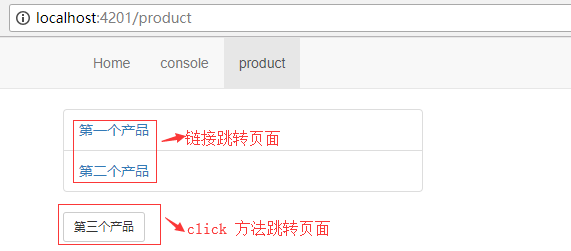
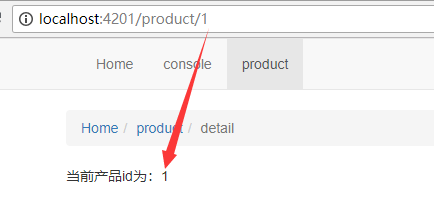
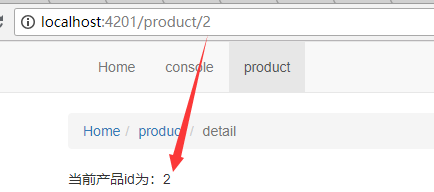
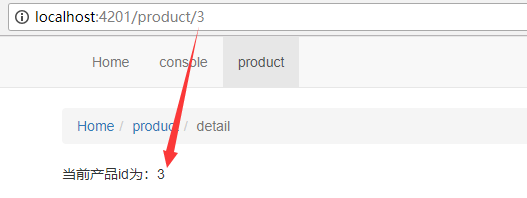
传参效果图如下所示。
product路由

点击product页面中 第一个产品

点击product页面中 第二个产品

点击product页面中 第三个产品 按钮

当参数是 Url 路径一部分时,使用该参数路由有两种方法。1,在页面中使用,如 product/list/list.component.html,暂时列举出3种格式(文中已列举);2,在组件中使用,如 product/list/list.component.ts,有3种格式(文中已列举)。接收该参数的方式暂时列举出4种格式(已在 product/detail/detail.component.ts 中列举出来),推荐使用其中存在 Map 字符的方法,因为在 Angular 以后的版本中关于路由参数会淘汰掉不存在 Map 字符的方法属性。

正常传参

如果在 url 中传递的参数不止一个,是多个的话,参数是 Url 路径的一部分显然不是一个很好的方式,这时应该传递参数应该使用正常的模式,即参数在 Url 的路径后面,以 ? 号隔开

1,使用命令 ng g m joke --routingng g c joke/list ng g c joke/detail 创建 joke 模块,joke/list 组件,joke/detail 组件,修改已有代码如下所示。
app-routing.module.st

1
2
3
4
....//代码块
{path:'product',loadChildren:'./product/product.module#ProductModule'},
{path:'joke',loadChildren:'./joke/joke.module#JokeModule'} //新增路由
....//代码块

app.component.html

1
2
3
4
5
<!-- 代码块 -->
<li routerLinkActive="active"><a [routerLink]="['/product']">product</a></li>
<!-- 导航栏新增joke链接 -->
<li routerLinkActive="active"><a [routerLink]="['/joke']">joke</a></li>
<!-- 代码块 -->

joke-routing.module.ts

1
2
3
4
5
6
7
8
9
....//代码块
import { ListComponent } from './list/list.component';
import { DetailComponent } from './detail/detail.component';

const routes: Routes = [
{path:'',component:ListComponent},
{path:'detail',component:DetailComponent}
];
....//代码块

2,在组件 UI 中传递参数
修改 joke/list.component.html 代码如下所示。

joke/list/list.component.html

1
2
3
4
5
6
7
8
9
10
11
<!-- 代码块 -->
<li class="list-group-item">
<a routerLink="/joke/detail" [queryParams]="{id:1,desc:3星}">第一个笑话</a>
</li>
<li class="list-group-item">
<a routerLink="/joke/detail" [queryParams]="secParmas">第二个笑话</a>
</li>
<li class="list-group-item"><!-- routerLink和[routerLink] -->
<a [routerLink]="['/joke/detail']" [queryParams]="thiParmas">第三个笑话</a>
</li>
<!-- 代码块 -->

joke/list/list.component.ts

1
2
3
4
5
....//代码块
secParmas={id:2,desc:'6星'}

thiParmas={id:3,desc:'9星'}
....//代码块

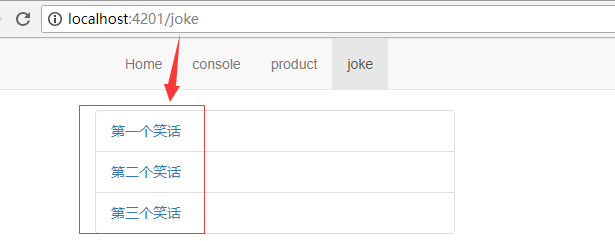
参数传递的效果图如下所示。

在组件 UI 中传递参数有多种格式。

3,在组件中传递参数,修改代码如下所示。
joke/list/list.component.html

1
2
3
<!-- 代码块 -->
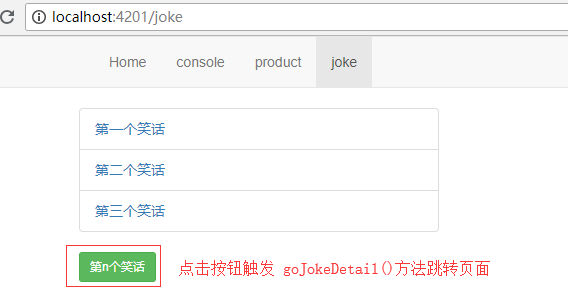
<button class="btn btn-sm btn-success" (click)="goJokeDetail()">第n个笑话</button>
<!-- 代码块 -->

joke/list/list.component.ts

1
2
3
4
5
6
7
8
import { Router } from '@angular/router'
....//代码块
constructor(private router:Router) { }
goJokeDetail(){
let tsParmas={id:9,desc:'n星'}
this.router.navigate(['/joke/detail'],{queryParams:tsParmas})
}
....//代码块

其效果图如下所示。

错误传参方式

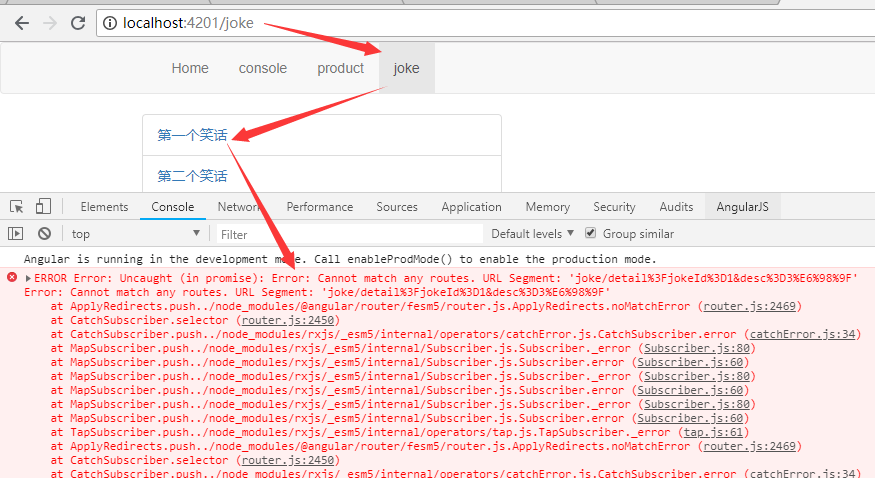
组件 UIa标签url路径中 直接写

1
2
3
4
5
<!-- 代码块 -->
<li class="list-group-item">
<a routerLink="/joke/detail?jokeId=1&desc=3星">第一个笑话</a>
</li>
<!-- 代码块 -->

Angular 中,这是一种错误的写法,其错误如下图所示。

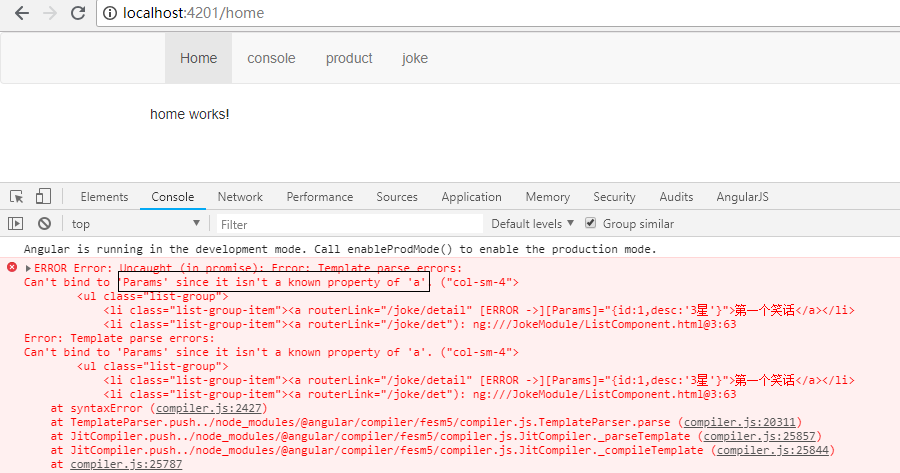
组件 UI 中没有使用 queryParams 传参,采用 Params 传参

Angular7 版本中,正常传递参数时(参数不是 Url 路径的一部分),只有 queryParams 属性才可以传递。

使用其它属性(如 Params)传递时,程序会报错,因为 Params 不是 a 链接的属性,其代码以及错误如下所示。

1
2
3
4
5
<!-- 代码块 -->
<li class="list-group-item">
<a routerLink="/joke/detail" [Params]="{id:1,desc:'3星'}">第一个笑话</a>
</li>
<!-- 代码块 -->

获取参数

修改 joke/detail 组件代码如下所示。

joke/detail/detail.component.html

1
2
3
4
5
6
7
8
9
<div *ngIf="nowJoke">
<p>笑话id:{{nowJoke.id}}</p>
<p>笑话描述:{{nowJoke.desc}}</p>
</div>

<div *ngIf="secJoke">
<p>笑话id:{{secJoke.id}}</p>
<p>笑话描述:{{secJoke.desc}}</p>
</div>

joke/detail/detail.component.ts

1
2
3
4
5
6
7
8
9
10
11
12
13
14
15
16
17
18
19
20
21
22
import { ActivatedRoute, Params } from '@angular/router';
....//代码块
export class DetailComponent implements OnInit {
constructor(private routeInfo:ActivatedRoute) { }

nowJoke:any;

secJoke={id:null,desc:null}

ngOnInit() {
// this.routeInfo.queryParams.subscribe((data:Params)=>{
// this.nowJoke=Object.assign({},data);
// })

//this.routeInfo.queryParamMap.subscribe((data:any)=>{
// this.nowJoke=Object.assign({},data.params);
//})

this.secJoke.id=this.routeInfo.snapshot.queryParamMap.get('id')
this.secJoke.desc=this.routeInfo.snapshot.queryParamMap.get('desc')
}
}

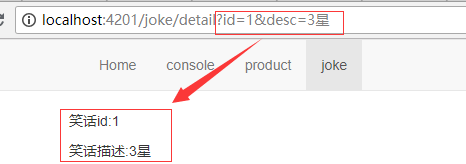
获取参数效果图如下所示。

获取正常参数的方式暂时列举出3种,如上 joke/detail/detail.component.ts 所示。

传参相似处

参数快照和参数订阅

参数快照和参数订阅都是获取路由参数的方法,它们的功能有一定的重复性,但也有一定的区别。

在上面的代码中,获取参数的方法分为参数订阅(subscribe)和参数快照(snapshot)。

其区别的代码示实例如下。
product/detail/detail.component.html

1
2
<!-- 代码块 -->
<a routerLink="/product/2">进入第二个产品</a>

参数订阅获取参数代码:product/detail/detail.component.ts

1
2
3
4
5
//代码块
this.routerInfo.paramMap.subscribe(data=>{
this.productId=data.get('productId');
});
//代码块

参数订阅

参数快照获取参数代码:product/detail/detail.component.ts

1
2
3
//代码块
this.productId=this.routerInfo.snapshot.paramMap.get("productId");
//代码块

参数快照

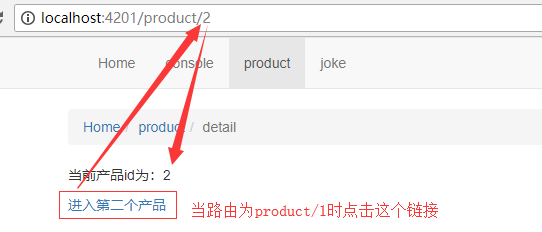
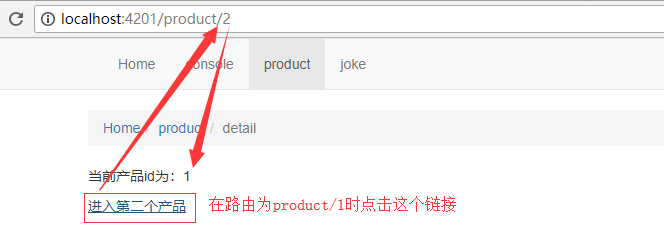
从上面的代码以及两张图对比中,可以发现,在参数订阅时,点击 进入第二个产品 链接,页面中的 productId 数据发生了改变,而在参数快照时,Url 地址发生改变,但页面中的 productId 并没有发生改变。

原因:这种情况主要发生在同一个组件的跳转。从 product/1 跳转到 porduct/2 时,都是在 product/detail 组件中跳转。当使用参数订阅,路由跳转时,根据订阅者模式,组件会再次获取路由参数;在使用参数快照时,由于在 product/1 路由下,product/detail 组件已经被创建了,当跳转到 product/2 时,组件不会重新执行 ngOnInit() 方法,所以不会重新获取参数。

paramMap 和 queryParamMap

在路由传参中,parmaMapqueryParamMap 都有被使用,它们是有很大的区别的,parmaMap 用于获取路由传参时,其参数是路由 Url 路径的一部分;queryParamMap 用于获取正常的传递参数。

其示例如下所示。
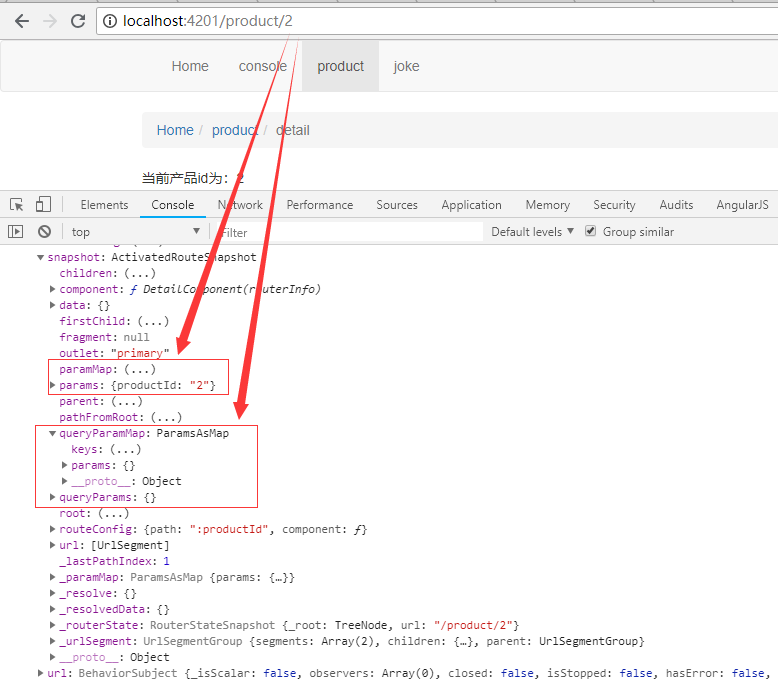
参数是路由 `Url` 路径的一部分

从上图可以知道,当路由参数是路由 Url 的一部分,其参数是放在 params 中的,若开发者从 queryParams 获取该参数是获取不到的。因为 queryParams 是一个空对象。
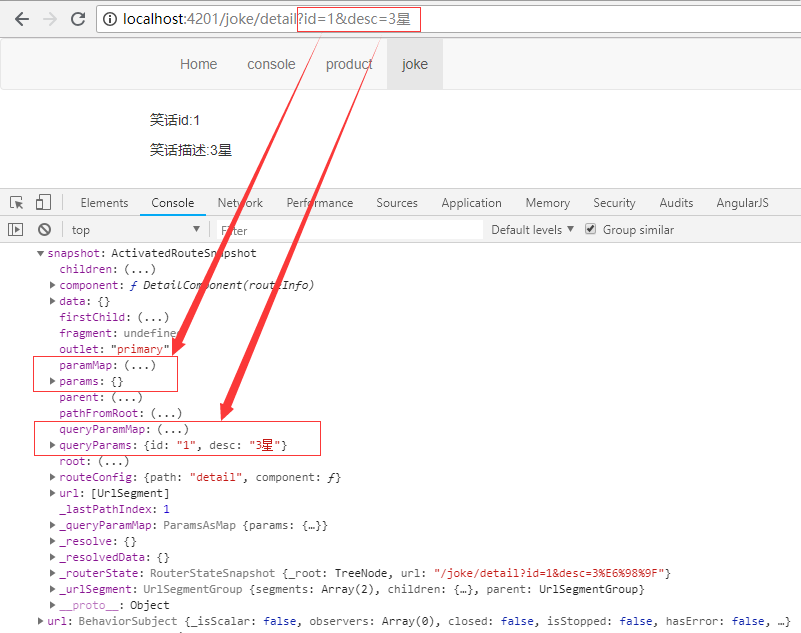
参数是正常参数

从上图可以知道,当路由参数是正常参数时,其参数是放在 queryParams 中的,若开发者从 params 获取该参数是获取不到的。因为 params 是一个空对象。

navigatenavigateByUrl 两个方法都可以用于页面导航,但它们之间也有一定的区别。router.navigateByUrl() 方法是使用一个全新的路由地址替换已有的路由地址;router.navigate() 方法是基于一系列输入参数,产生一个新的 URL 地址。

示例:在路由中存在 辅助路由 时,假如当前路由为 /product(aux:chat),当运行 router.navigateByUrl(['/product/1']) 后,其 Url 地址栏为 product/1;当运行 router.navigate(['/product/1']) 后,其 Url 地址栏为 product/1(aux:chat)